
Valve’s New Steam Controller: The Kotaku Review
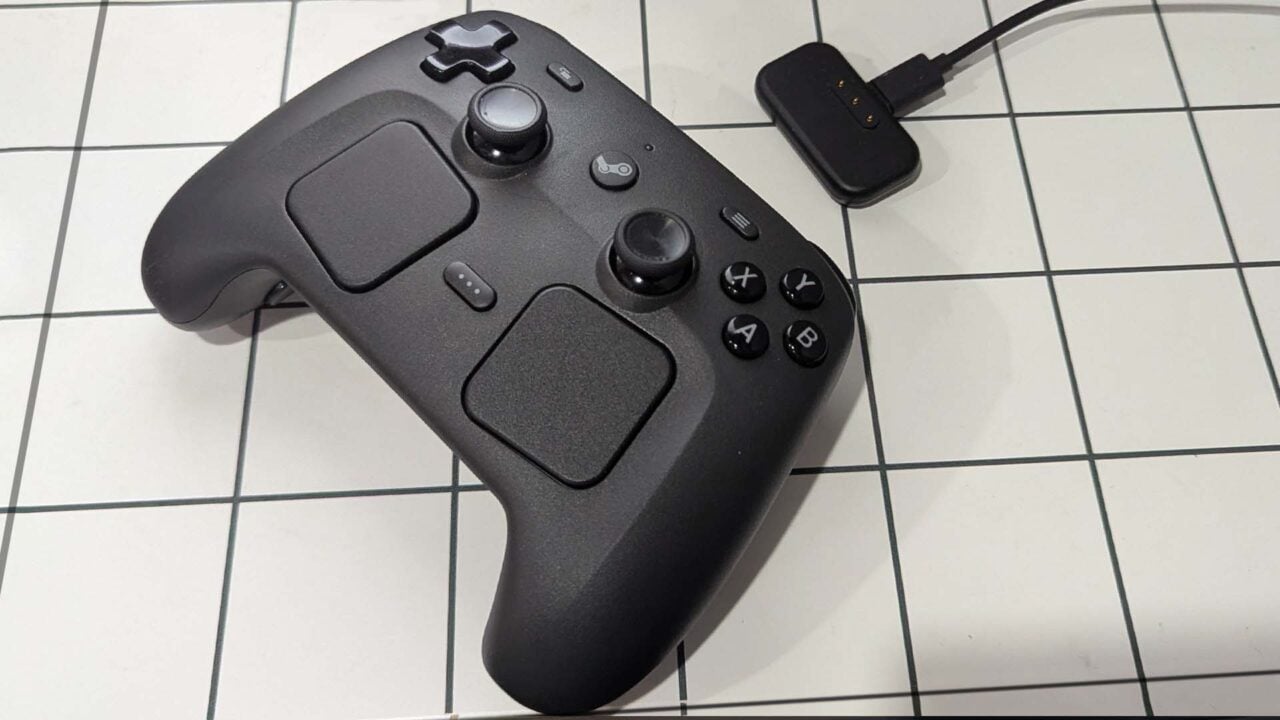
When Valve sent me a Steam Controller earlier this month ahead of its release on May 4, I wasn’t sure what to expect. The original Steam Controller, released back in 2015, was an interesting experiment, but not a controller I’d ever use daily. And the new, upcoming Steam Controller looked a bit less weird, but still not quite like most gamepads out there. Plus, there was a tiny little puck that you connected to your computer that also charged it. That seemed neat, but potentially finicky. But after using the Steam Controller and its tiny little puck for a few weeks to play a plethora of PC games, I’m no longer skeptical that this thing is a great controller. I am, however, still skeptical about whether $100 is the right price for this controller, even if it’s my favorite PC gamepad in years. I think it’s worth it, but I’ll be curious to see if Valve can convince others to pay that price. I’ll admit that the Steam Controller ain’t a looker. It looks bloated and is covered in buttons, pads, sticks, and more buttons. And when you turn the controller around, you’ll find four more buttons hidden in the grips, which themselves can be used as input devices, too. At first, holding it felt strange. But once I realized the back buttons take some amount of effort to press, I started holding it like an Xbox controller, and soon, it felt just as natural. Still, this odd design might scare away some, but Valve had a good reason for going with it. Valve told Kotaku it wanted the Steam Controller to contain all of the input options found on the Steam Deck. And it does. That means if you play Steam Deck games using a specific layout, it will just work on the Steam Controller. That’s the motto of the Steam Controller: It just works. Even using beta software, that was my experience with the new gamepad. Setting it up is super easy. You plug in the USB puck (which is not hardwired to the cable, thankfully) into your PC, and assuming you have Steam installed, it will detect that and walk you through the simple setup. This process mostly consists of attaching the Steam Controller to the puck via a magnetic connection, updating the puck and the pad, and then unhooking the controller from its plastic partner, and there you go. That’s it. No Bluetooth fuckery to be had and no dealing with signals and different input settings. Whenever I wanted to use my Steam Controller, I just grabbed it, tapped the Steam logo button on it, and was off to the races. And it worked every time. Another press of the Steam button and Steam opened up into Big Picture mode, and I was playing Windrose and other games easily. When I was done, I tossed it onto the magnetic charging puck and left it there. Valve engineers told me that it won’t overcharge, and the puck is designed to keep the battery healthy for as long as possible. Once I had the controller up and running, I threw a few different games at it. I played many hours of the recently released pirate game Windrose using the controller and had no issues. I appreciate the back buttons on the Steam Controller, as I could easily assign some of Windrose‘s features, which are buried in a few menus or sub-menus, to the back buttons. Entering and exiting build mode on the Steam Controller was a breeze once I set up a back button shortcut. Other games I tried included Grand Theft Auto V, Fallout 76, Portal 2, Vampire Crawlers, and Borderlands 4. All of these worked without any issue, and unless I set up some back button shortcuts, I’d quickly forget I was even using a Steam Controller while playing games. I also tested out Jurassic World Evolution 3, Civilization, and Two-Point Museum, games that aren’t great on a controller normally. And while I still think these are games best played with a keyboard and mouse, the Steam Controller’s touch pads and extra inputs did make these far more playable. Even more impressively, I tried out a few non-Steam games, including GTA: Carcer City, a mod for San Andreas, and while I needed to change a few buttons, after a bit of tinkering I was playing the mod with no issue through Steam. So yes, any emulator or other game or mod you have running through Steam will work, with some effort, with the new controller.
Narrative Intelligence Brief
This article was published by Kotaku, a source frequently categorized with a Unknown bias based in United States of America. Our narrative intelligence engine continuously monitors coverage from this outlet to track framing, bias, and rhetorical patterns. Our initial algorithmic scan of this specific piece did not flag high-confidence rhetorical techniques, suggesting a generally straightforward reporting style or neutral framing. By understanding the editorial perspective of Kotaku, readers can better contextualize the information presented and compare it across our broader media matrix to find the real narrative.
Explore related topics: Stay informed with Real Narrative News as we track unfolding stories. Dive deeper into our coverage of pivotal topics including white house, brazil morocco, brasil marruecos, fifa cup, cup opener, coupe monde, signed sunday, nba finals, donald trump, and cup match. Our intelligence streams continuously monitor these keywords to bring you unbiased analysis and real-time updates on topics like "Valve’s New Steam Controller: The Kotaku Review".
More from Kotaku
June 13, 2026
Tough Talk And Confronting Slop In Third Manifesto Game Jam
June 13, 2026
Firefighters Investigating Explosion Caused By Meta Quest 3 In Maine Home
June 13, 2026
Sealed Super Mario Bros. Sells For An Unbelievable $3 Million, Crushing The Previous Record For A Vintage Video Game
June 12, 2026
Shareholders Are Trying To Bully Elden Ring Maker FromSoftware Into Divorcing Bandai Namco
June 12, 2026
Xbox CEO Reportedly Wants To Speed Up Release Of Next Halo And Fallout Games, But Spinning Off The Business Entirely Isn’t Completely Off The Table
Analysis Methodology
This narrative analysis was generated using the CoDataLab Global Intelligence Engine. Our proprietary AI scans thousands of cross-border sources to identify sentiment patterns, framing techniques, and potential media bias. While AI provides the data-driven foundation, our objective is to empower readers with additional context beyond the standard headline.The content displayed above is a structured summary designed for rapid information processing. For the full original report, please visit the source outlet.More Coverage
Discussion